NEW ChatGPT Shopping and Ads feed, included

Your feed, split into labels. From plain words.

You write, in plain language, which products belong in a campaign: “products with ROAS above 4 and margin above 30%”. Skylabely writes the rule, shows how many products it hits and sends them to Google, Meta, TikTok and ChatGPT, every hour.

An alternative to Adcore and Channable, built for stores and agencies. In beta with the first stores.

app.skylabely.com
Skylabely: the feed score, a label written with AI and the list of labels

Three steps. No hand-written rules.

You do not learn a rule editor. You describe what you want, check it on products, send.

Connect the feed

A link to your store feed: WooCommerce, Shopify, any CSV or XML. We read it every hour and the basic cleanups switch on by themselves.

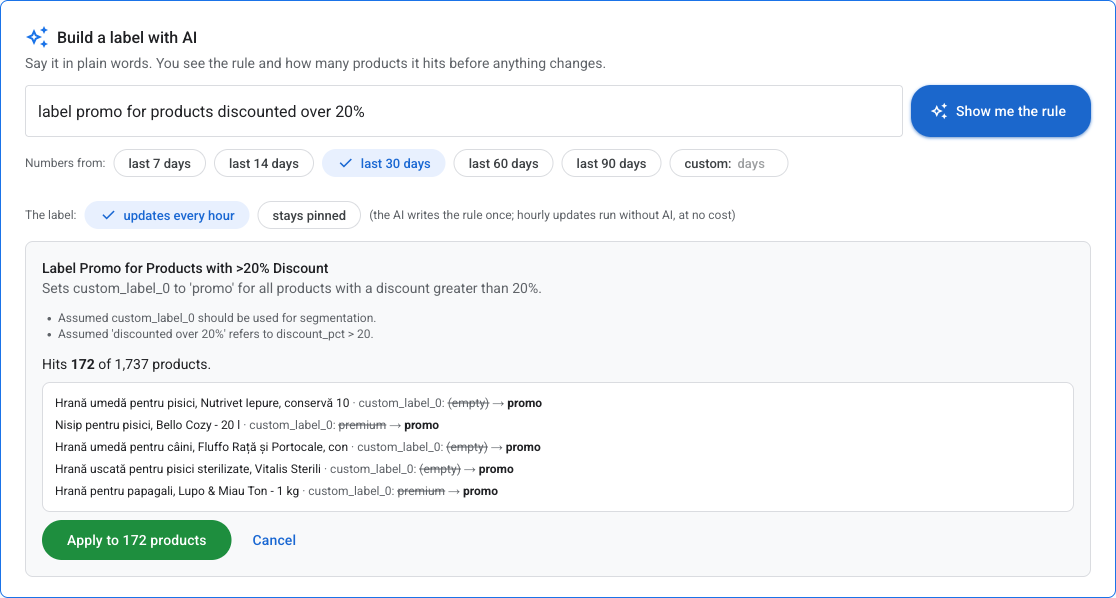
Describe the label

“The cheapest product of every brand”, “what lost half its ROAS this week”. The AI writes the rule, you see how many products it hits before anything changes.

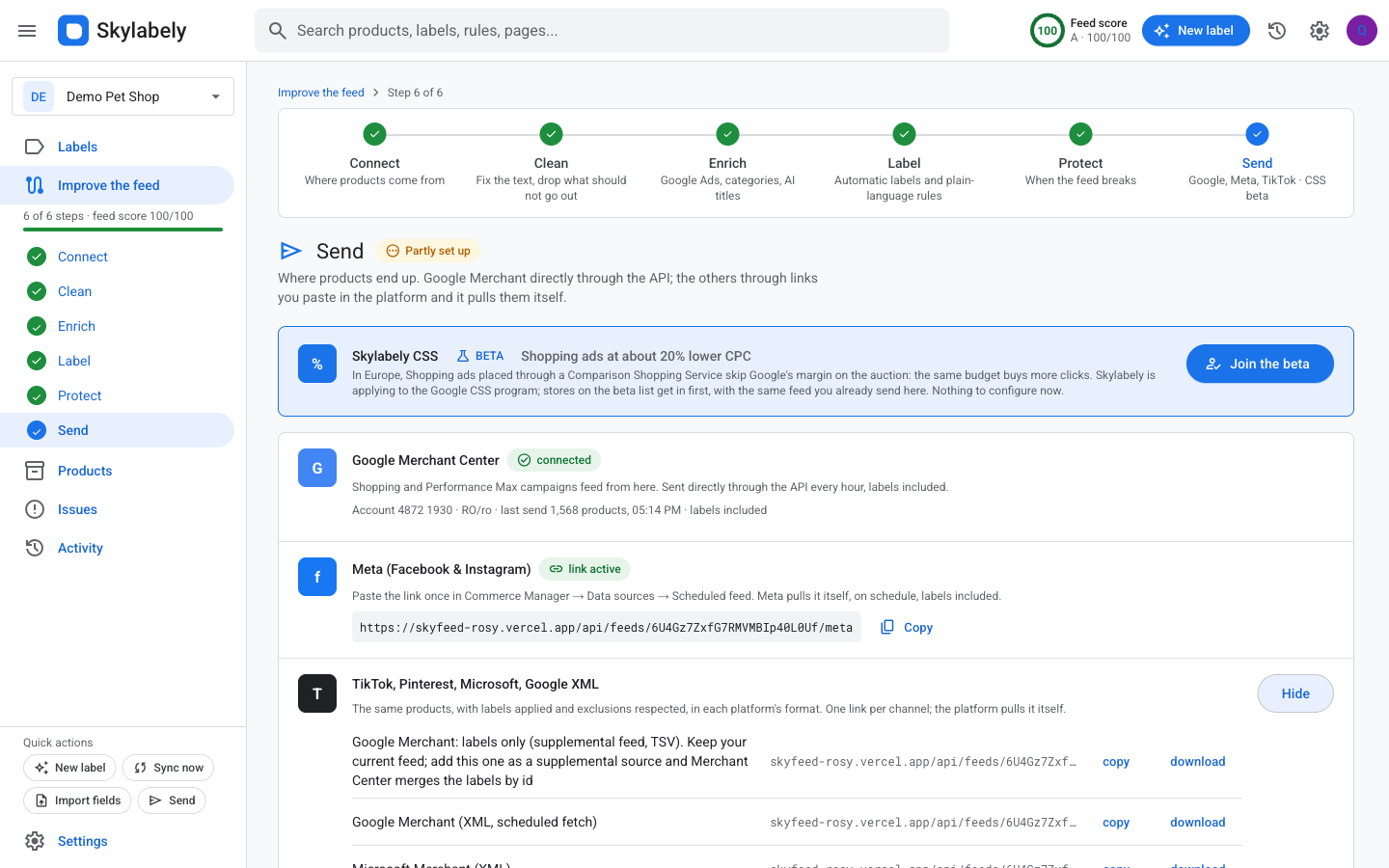
Send

Google Merchant directly through the API, the other channels through links you paste once. The labels reach your campaigns and stay fresh, with no AI running every hour.

The “Build a label with AI” box: the request in words, the rule the AI wrote and “Hits 172 of 1,737 products”

Labels are the centre. Everything else exists to earn them.

Everything below is there so the label is right: good data, clean products, real numbers.

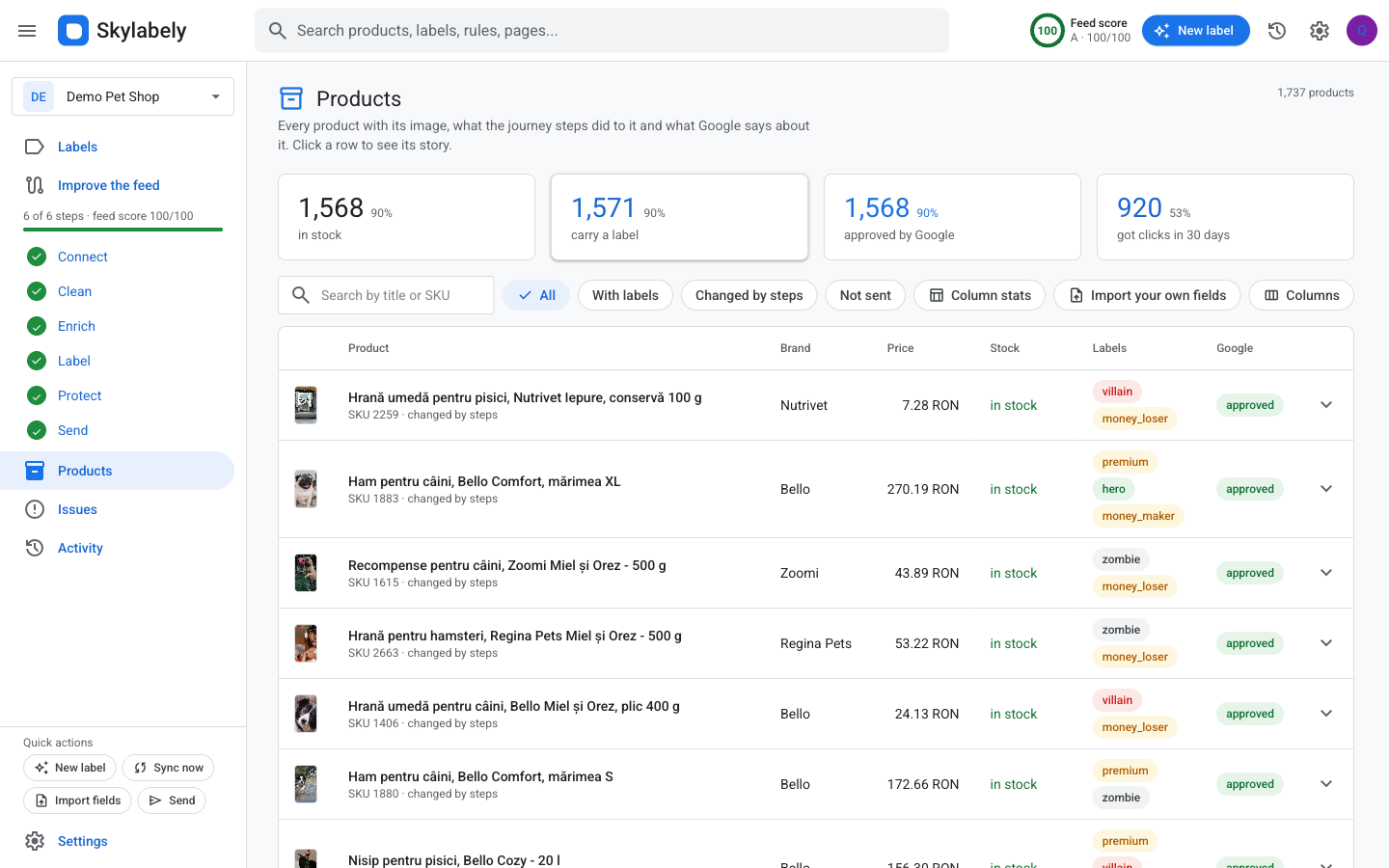
Every product tells you why it got its label

Open a product and read its story: how it came in from the feed, what every step changed, which rule caught it and what Google says about it. Nothing happens behind your back.

  • Every field: from the feed, after the steps, and your own
  • Columns of your choice, remembered per store
  • Your own fields from Excel: markup, purchase price, anything
The product table with labels, Google’s verdict and columns you picked

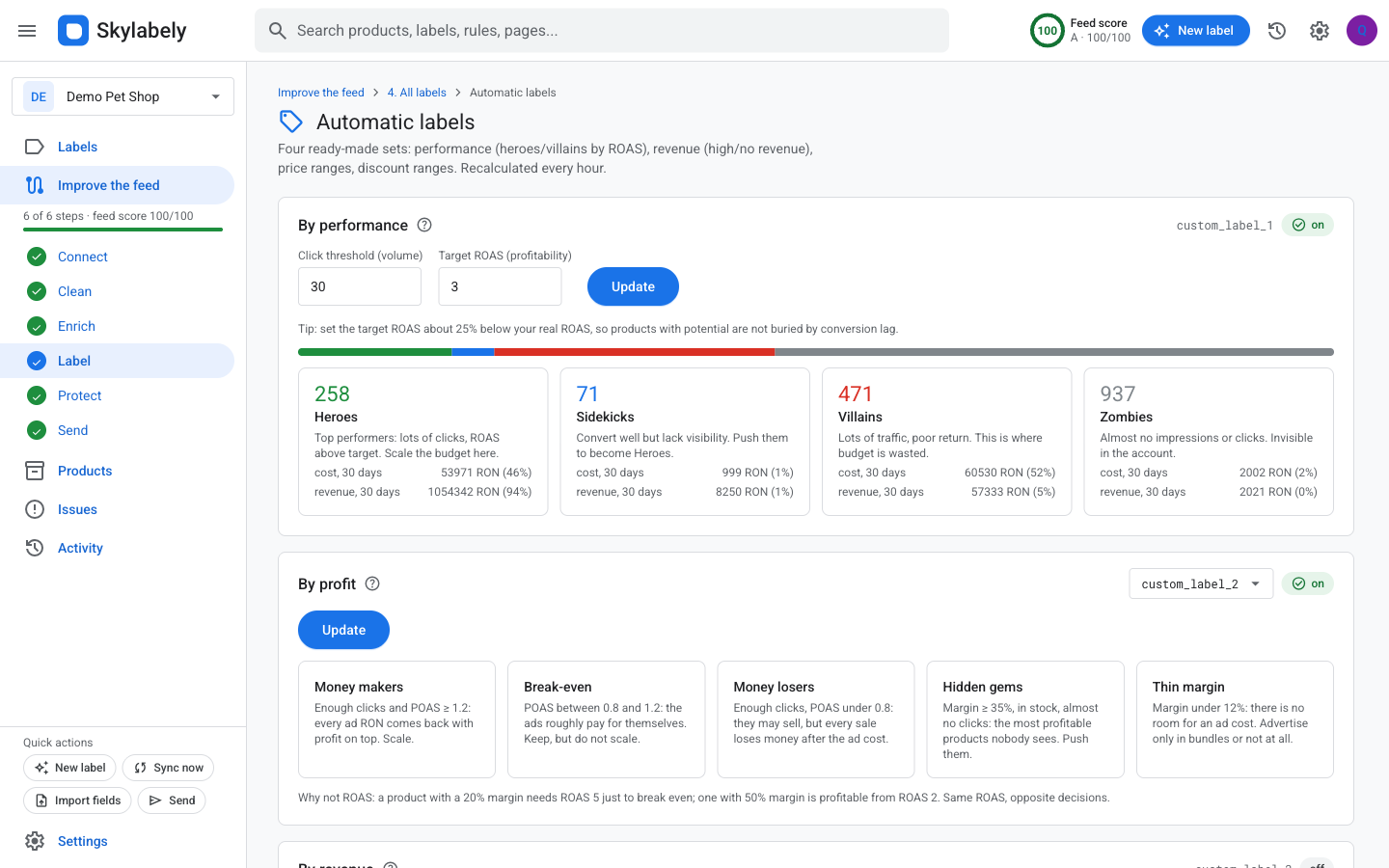
Google Ads numbers per product, with the conclusions drawn

Cost, clicks, revenue, ROAS over 7, 14, 30, 60 or 90 days. And the findings ready-made: money spent with zero sales, the star products, what dropped this week. Each finding becomes a label in one click.

Ads insights: spent with no sales, star products, 7-day drops

Profit, not just ROAS

Bring purchase prices from an Excel file (drop it on the card, the AI recognises the columns) and get margin, POAS, break-even ROAS and net profit per product. The “money makers” and “money losers” labels build themselves.

Importing purchase prices from Excel and the profit labels

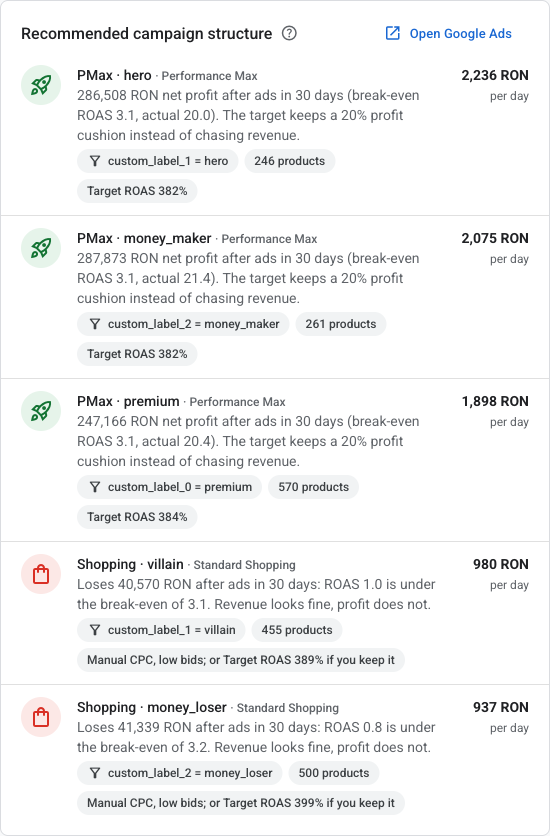
A campaign structure recommended from your labels

Which campaigns to create, on which label, with what daily budget and ROAS target, computed from the last 30 days. You create them in Google Ads; we tell you what deserves its own campaign and what should be paused.

Recommended campaign structure: PMax for winners, cheap Shopping for losers

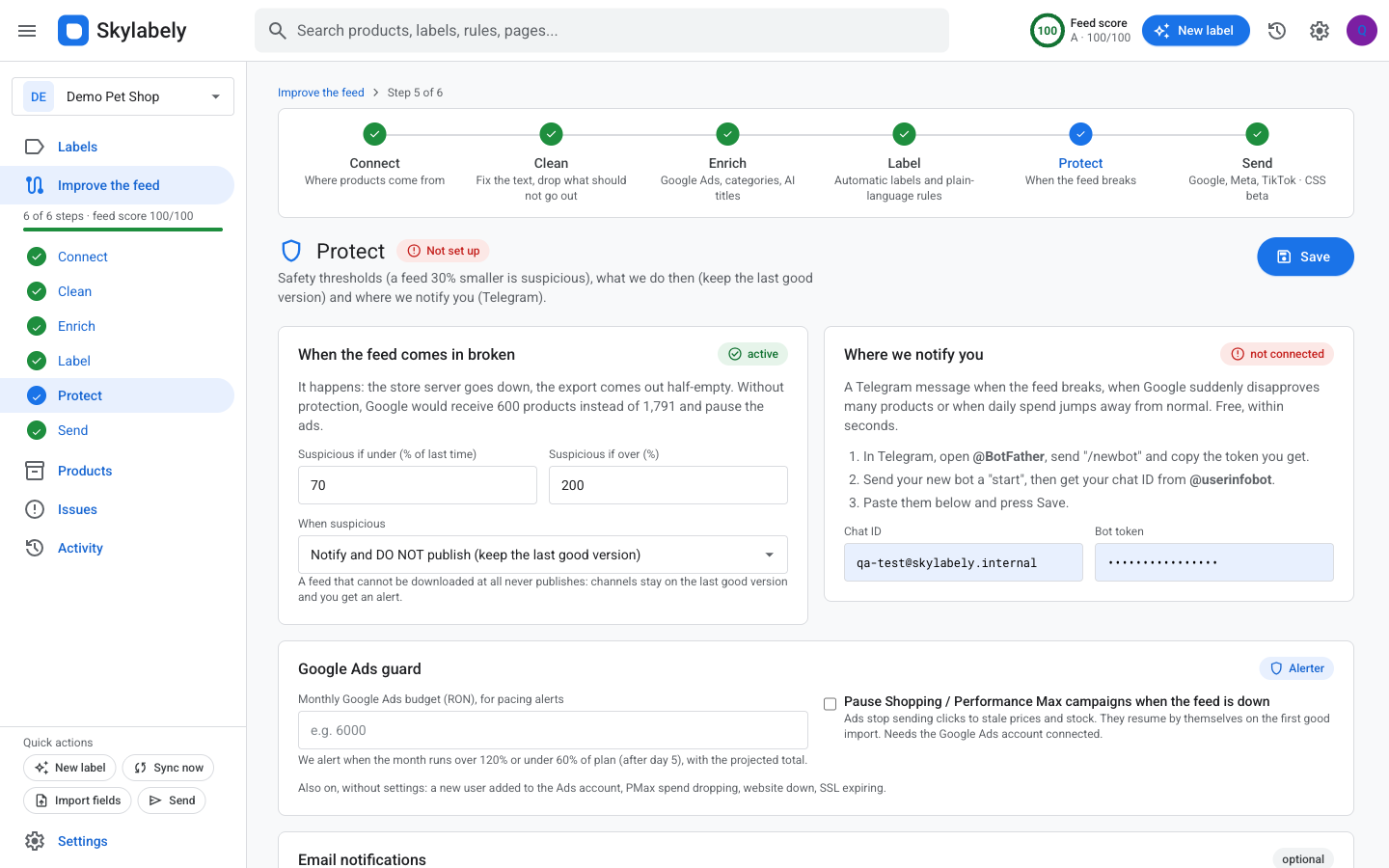
When the feed breaks, nothing broken goes out

A feed with 30% fewer products is suspicious: we hold it, keep the last good version and tell you by email or Telegram. Optionally we pause the Shopping campaigns and resume them when the feed is back. Plus site down, SSL expiring, monthly budget burning too fast.

Protect: thresholds, last good version, alerts by email and Telegram, Google Ads guard

One feed, every channel

Google Merchant through the API, labels included. For the others, a link you paste once in the platform; it pulls the feed itself. AI translations for a second market, with a feed per language.

GoogleMicrosoftMetaTikTokPinterestChatGPTCompariShopManiaidealoCriteoAmazoneBay
Send: Google Merchant connected, feed links for every channel

What others sell separately is included here

Two things you will not find elsewhere: the plain-language label that produces a verifiable rule, and the explanation per product. The rest they had too. We put it in the price.

Sample modeSee the effect on products before you apply. The number of products hit, with examples.
Versions and historyEvery import is a version. Every adjusted rule keeps its previous one.
AutopilotCleanups, filters and performance labels switch on by themselves. Everything the AI proposes, you approve.
AI categories and attributesThe right Google category from the official list; colour, size, material read from the title.
Feed scoreOne number, 0-100, and the three things that raise it. Visible on every page.
Unlimited usersYou pay per store, not per person. An agency picks, per store, who pays.

Launch pricing

Per managed store, not per user. No long-term contract.

Start

39 €/month
  • 1 store
  • up to 5,000 products
  • unlimited users
  • every channel, all the AI
Request access
Most chosen

Pro

99 €/month
  • 3 stores
  • up to 25,000 products
  • unlimited users
  • every channel, all the AI
Request access

Agency

249 €/month
  • 10 stores
  • up to 100,000 products
  • unlimited users
  • billing per store: the agency or the client
Request access

+19 € per month for every store above the plan. The first stores join the beta with us: we set them up together.

Questions

Does it burn AI every hour? What does it cost me?

No. The AI writes the rule once, when you ask for it. The hourly update runs the rule, without AI. The AI cost is included in the subscription.

Do I have to replace my current Merchant Center feed?

No. You can add just a supplemental feed with the labels: Merchant Center merges them by product id and your feed stays as it is.

How does Google Ads connect?

You give us the account ID and invite a user. The per-product numbers (cost, clicks, revenue, ROAS) appear right away, then refresh every hour.

I have several stores or clients?

Every store has its own journey: feed, rules, channels, history. You switch from one menu. On the Agency plan you choose, per store, who pays.

What happens if the store feed breaks?

We send nothing. We keep the last good version, tell you, and, if you want, pause the Shopping campaigns until it is back.

Tell us which products belong in the campaign. The rest is a rule.

Send us your feed link and we show you, the same day, what the labels would look like on your products.

Request access